
RealHomes CRM Plugin
Arbitrary File Upload
This blog post is about a Subscriber+ arbitrary file upload vulnerability in the RealHomes CRM. If you're a RealHomes CRM user, please update to at least version 1.0.1.
This vulnerability was discovered and reported by Patchstack Alliance community member wackydawg.
✌️ Our users are protected from this vulnerability. Are yours?
Identify vulnerabilities in your plugins and get recommendations for fixes.
Request auditProtect your users, improve server health and earn additional revenue.
Patchstack for hostsAbout the RealHomes theme
The RealHomes theme, with over 30,000 active installations, is a theme specifically designed for creating professional real estate websites and was developed by InspiryThemes. The theme itself has a bundled plugin called RealHomes CRM.

The theme itself offers extensive features like advanced search, property listing layouts (grid, list, map), front-end submission/management for users, payment integration (PayPal/Stripe), and integration with page builders like Elementor for easy customization, making property management and showcasing properties efficient for agents and businesses.
The security vulnerability
In versions 1.0.0 and below, the RealHomes CRM plugin is vulnerable to arbitrary file upload, due to allowing any logged-in user to arbitrarily upload files via the upload CSV file process. This means any Subscriber or higher user is able to inject malicious code through the upload process, which can lead to a full site takeover.
This vulnerability has been patched in version 1.0.1 and is tracked with CVE-2025-67968.
The root cause of the issue lies in the upload_csv_file function:
public function upload_csv_file() {
	check_ajax_referer( 'realhomes_crm_ajax_nonce', 'security' );

	if ( empty( $_FILES['csv_file'] ) || $_FILES['csv_file']['error'] !== UPLOAD_ERR_OK ) {
		wp_send_json_error( [ 'message' => esc_html__( 'Invalid file upload.', REALHOMES_CRM_TEXT_DOMAIN ) ] );
	}

	// Get the uploaded file info
	$file       = $_FILES['csv_file'];
	$upload_dir = wp_upload_dir();
	$target_dir = trailingslashit( $upload_dir['basedir'] ) . 'realhomes-crm/csv-import/';

	// Ensure target directory exists
	if ( ! file_exists( $target_dir ) ) {
		wp_mkdir_p( $target_dir );
	}

	$file_name   = pathinfo( $file['name'], PATHINFO_FILENAME );
	$file_ext    = pathinfo( $file['name'], PATHINFO_EXTENSION );
	$target_file = $target_dir . $file['name'];

	// Check if the file already exists and append a numeric postfix if needed
	$counter = 1;
	while ( file_exists( $target_file ) ) {
		$target_file = $target_dir . $file_name . '-' . $counter . '.' . $file_ext;
		$counter ++;
	}

	// Move the uploaded file to the target directory
	if ( move_uploaded_file( $file['tmp_name'], $target_file ) ) {
		$file_name     = basename( $target_file );
		$file_size     = file_exists( $target_file ) ? round( filesize( $target_file ) / 1024, 0 ) : 0; // File size in KB
		$uploaded_date = current_time( 'mysql' );
--------------------------- CUT HERE ---------------------------
First, we notice that there is a nonce check using the check_ajax_referer function. However, the realhomes_crm_ajax_nonce nonce value itself can be fetched from Subscriber role users on the wp-admin base page or front-end page.
Second, there is no proper permission check on the function, which allows users to just supply arbitrary files via $_FILES['csv_file']. Lastly, the function didn't have a proper file type and name check, and will directly upload the file via move_uploaded_file to the server.
The patch
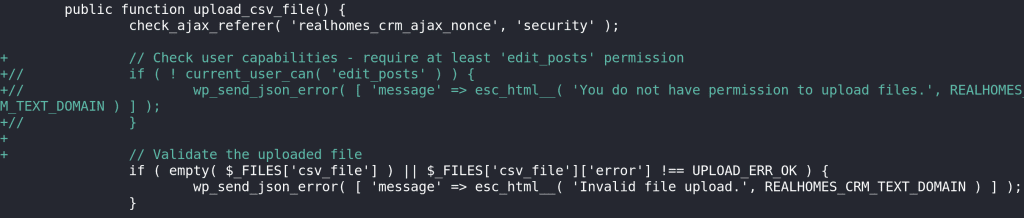
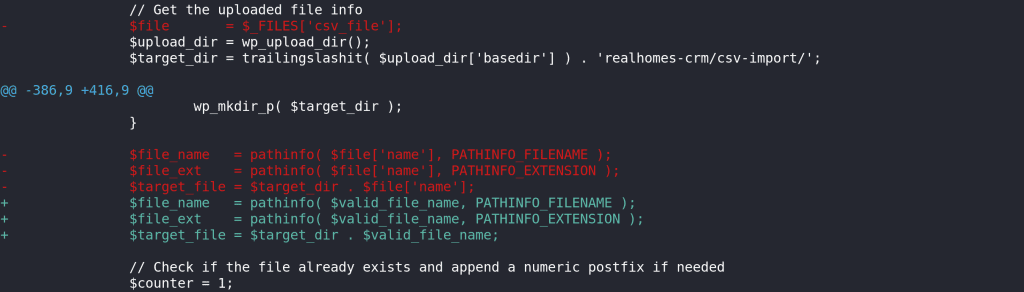
In version 1.0.1, the vulnerability is mitigated with the addition of a current_user_can permissions check, ensuring that only legitimate, privileged users are allowed to use this AJAX action. The patch also implements a proper file type and extension check using the wp_check_filetype function.

Conclusion
Nonce validation is essential for any site functionality that can cause changes, and a lack of nonce validation can lead to other vulnerabilities, such as CSRF attacks.
However, like the WordPress developer documentation says:
Nonces should never be relied on for authentication, authorization, or access control. Protect your functions using current_user_can() and always assume that nonces can be compromised.
Even when limited to only showing to the correct users, a nonce is not a substitute for proper user validation, as the risk of compromise always exists. And when shown more broadly, such as in this case, it leads to a common problem in many WordPress components, where access control is only limited by who can click the View Page Source button and find a nonce hiding in there.
Privileged functionality should always be specifically validating permissions, and cannot just assume that only the correct users will have the needed nonce.
Lastly, always implement a proper file type and extension check on a file upload process. One of the built-in functions that can be used is the wp_check_filetype function.
Want to learn more about finding and fixing vulnerabilities?
Timeline
🤝 You can help us make the Internet a safer place
Streamline your disclosure process to fix vulnerabilities faster and comply with CRA.
Get started for freeProtect your users too! Improve server health and earn added revenue with proactive security.
Patchstack for hostsReport vulnerabilities to our gamified bug bounty program to earn monthly cash rewards.
Learn more